



Download Houseparty – video chat, group call, virtual hangout, social app, video messaging, online games, screen sharing, live video, fun games, interactive games
Overview
Houseparty is a social chat application designed to facilitate face-to-face interactions in a fun and engaging way. The software enables users to maintain personal connections through live video calls, with support for up to 10 participants in a single group session. It is particularly suited for individuals seeking a dynamic alternative to conventional video conferencing tools, especially those who value entertainment and interactivity during virtual gatherings. The app allows users to stay connected with friends and family regardless of geographical distance, making it ideal for remote socializing, virtual parties, and casual hangouts.
Houseparty integrates video messaging, real-time friend tracking, and interactive games such as Heads Up, Trivia, and Quickdraw, enhancing the overall experience beyond standard video calling. Users can initiate calls with a single tap or send a quick greeting via the wave icon to signal availability. The app also supports screen sharing, which adds utility for collaborative tasks or shared entertainment. While the developer, Houseparty Inc., has not provided additional details about the company’s background, the app’s focus on social engagement and real-time interaction is evident in its feature set. It is available on multiple platforms, including Windows, Mac, iOS, and Android, making it accessible to a broad audience.
Key Features & Capabilities
- Group Video Calls – Supports up to 10 participants in a single live video session, enabling inclusive and dynamic virtual gatherings.
- Interactive Games – Built-in games like Heads Up, Trivia, and Quickdraw allow users to play together during calls, enhancing engagement and fun.
- Video Messaging – Users can send short video messages to friends, offering a personal and expressive way to communicate.
- Friend Discovery – The app suggests potential friends based on your contacts, helping expand your social network within the platform.
- Room Locking – Call hosts can lock a room to prevent unauthorized entries, maintaining privacy and control over who joins the session.
- Screen Sharing – Allows users to share their screen during a call, useful for collaborative viewing or shared experiences.
- Real-Time Presence Indicators – Shows which friends are online and ready to chat, enabling instant connection.
These features are designed to transform routine video calls into lively social events. For instance, a group of friends can start a call, play a round of Trivia, and then switch to screen sharing to watch a movie together. The ability to invite others into a call—even allowing guests to bring their own friends—adds flexibility to social interactions. The video messaging function is particularly useful for quick check-ins or spontaneous communication. Overall, the software aims to reduce the monotony of traditional video chats by blending communication with entertainment, making it a compelling choice for users who prioritize social engagement over formal functionality.
User Interface, Workflow & Performance
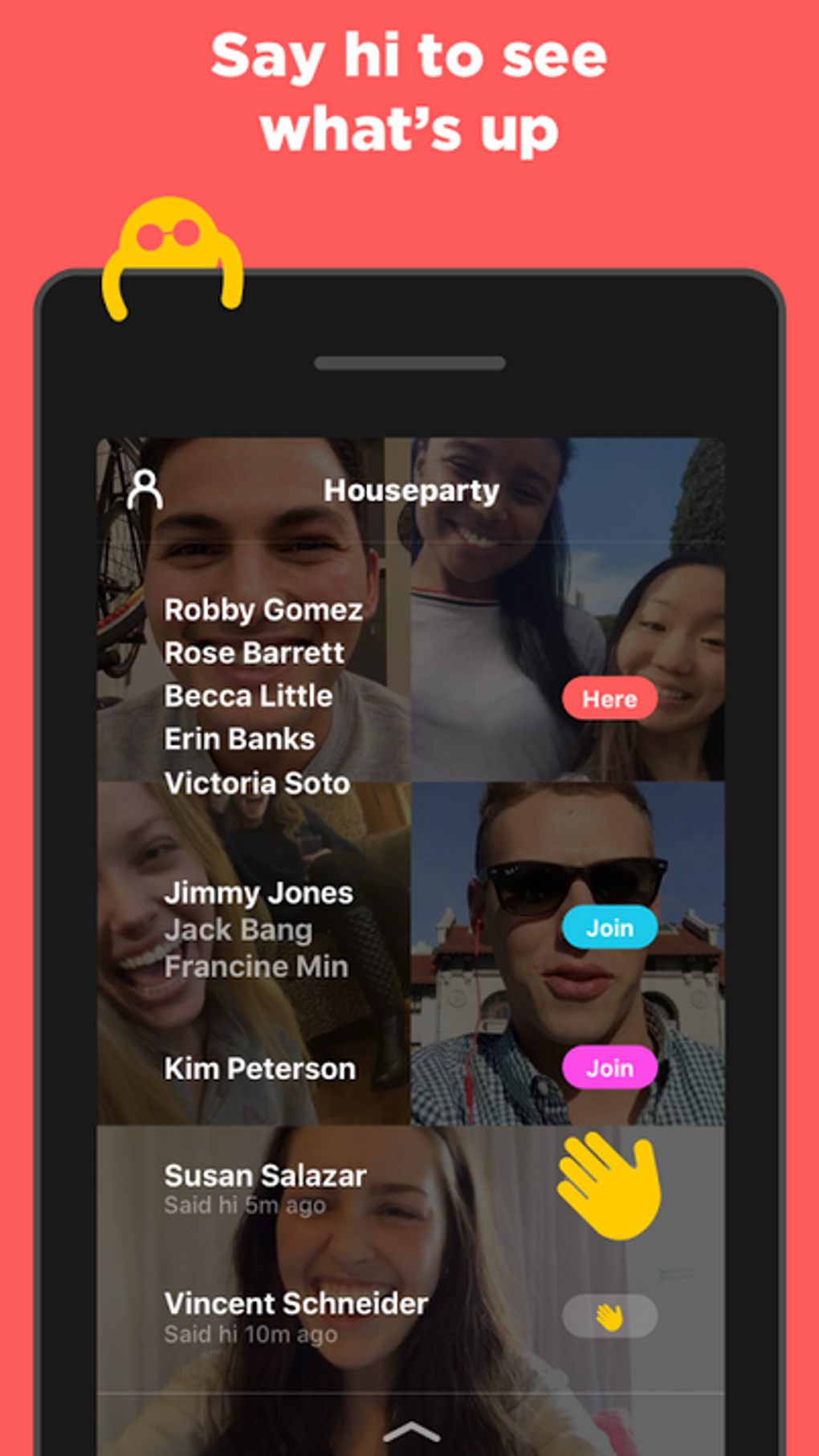
The user interface of Houseparty is intuitive and visually oriented, centered around a clean layout that highlights active friends and ongoing calls. Navigation is straightforward, with key actions like starting a call or sending a greeting accessible through clearly labeled icons. The main screen displays a grid of friends, indicating their online status, which simplifies the decision-making process when initiating a session.
Workflow efficiency is enhanced by the app’s seamless integration of video calling, messaging, and gaming. Users can transition between features with minimal disruption, maintaining a fluid social experience. However, performance observations are based on general software behavior patterns, as exact performance data was not specified. The developer did not provide additional details on CPU or RAM usage, nor did they outline specific stability metrics. Users may experience occasional call dropouts, particularly in environments with unstable internet connections, which could impact the continuity of group sessions.
Compatibility & System Requirements
Houseparty is available for Windows, Mac, iOS, and Android operating systems. The software version is 10.1.2, with a file size of 150 MB. While the app supports multiple platforms, exact system requirements were not listed. The developer did not specify minimum hardware specifications such as processor speed, RAM, or storage capacity. Compatibility information is limited to the operating systems mentioned, and no details were provided about support for older or low-end devices.
Pros and Cons
Pros
- Supports up to 10 participants in a single group video call
- Includes built-in interactive games to enhance social engagement
- Offers video messaging for quick, personal communication
- Real-time friend presence tracking improves connection speed
- Screen sharing feature enables collaborative viewing or sharing
- Available on multiple platforms including Windows, Mac, iOS, and Android
Cons
- Occasional call dropouts reported, especially with unstable internet
- Exact system requirements and performance metrics were not provided
- Privacy controls are limited to room locking; no advanced access settings
- May consume significant bandwidth during group calls with screen sharing
- Developer did not provide detailed information on long-term stability or updates
FAQ Section
Is Houseparty available for Windows and Mac?
Yes, Houseparty is available for both Windows and Mac operating systems.
Can I use Houseparty without an internet connection?
No, Houseparty requires a stable internet connection to function, as it relies on live video streaming and real-time data transfer.
Is Houseparty free to download and use?
Yes, Houseparty is free to download and use. There are no subscription fees or in-app purchases required for basic functionality.
Does Houseparty support offline gameplay?
No, Houseparty’s interactive games require an active internet connection to function and cannot be played offline.
How often does Houseparty receive updates?
The software version is 10.1.2, but the developer did not provide information on the update frequency or release schedule.
Final Thoughts
Houseparty stands out in the crowded social app market by combining video calling with entertainment features like interactive games and screen sharing. Its design prioritizes ease of use and social engagement, making it ideal for casual users, friends, and families who want to stay connected in a fun and dynamic way. While technical issues such as call dropouts may affect user experience under certain network conditions, the app’s core functionality remains robust and accessible across multiple platforms. For those seeking a lively alternative to traditional video chat tools, Houseparty offers a compelling blend of communication and entertainment. Download Houseparty now.






.png)
